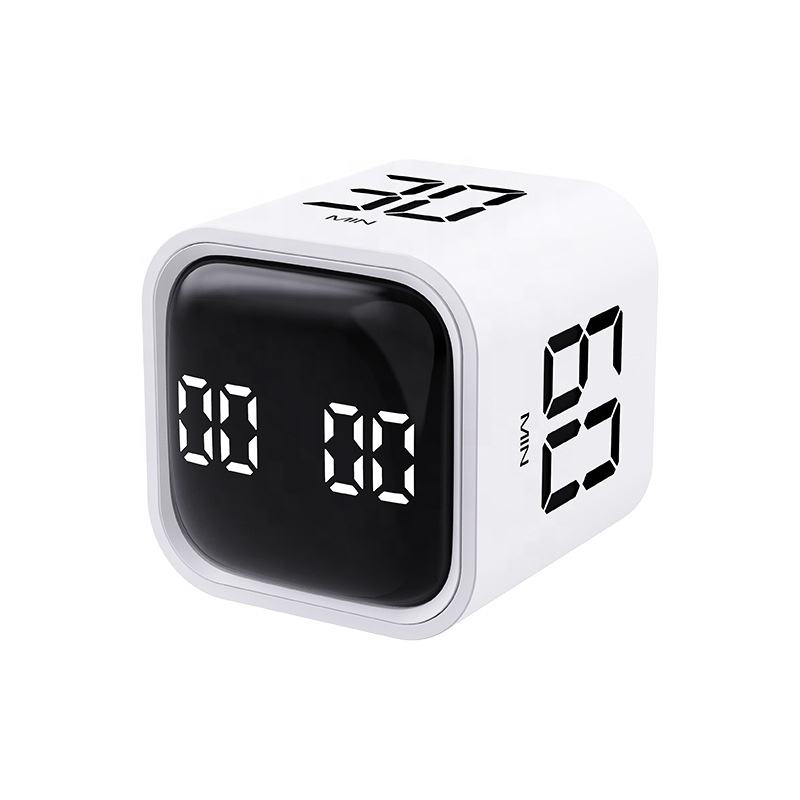
Views: 0 Author: Site Editor Publish Time: 2026-06-22 Origin: Site
Smartphones are brilliant tools, but engineers explicitly design them to hijack your attention. When you use your phone to track time, you walk straight into a notification trap. A quick glance at a remaining countdown often spirals into doom-scrolling. Mobile applications remain deeply flawed tools for extended deep work. A dedicated Digital Study Timer offers a robust solution. It acts as a physical anchor for your focus. Pressing a physical button demands a tactile commitment to begin working. This simple ritual strips away digital temptations and forces you into a productive mindset. We want to move beyond generic study advice and provide a pragmatic evaluation framework. In this guide, you will learn how to assess these tools feature-by-feature. We will help you select the exact device you need based on workflow demands, sensory preferences, and hardware reliability.
You might wonder why you should buy a separate physical device. After all, your phone already has a built-in clock application. The answer lies in how our brains handle distractions and workflow transitions.
Modern work requires immense concentration. When you glance at a smartphone screen to check remaining minutes, you expose yourself to unread messages. An innocent look easily becomes a twenty-minute detour. Psychologists call this context switching. Every time you shift attention away from a primary task, your brain expends energy. Rebuilding deep focus often takes up to twenty minutes after a single digital interruption. A physical device keeps your eyes off your screen. It protects your attention span from these hidden cognitive taxes.
You have a limited amount of willpower each day. Unlocking your phone requires you to navigate an operating system filled with colorful, highly engineered icons. Resisting the urge to open social media drains your cognitive energy. This phenomenon is known as decision fatigue. A physical Digital Study Timer serves one single utility. You interact with it to track time. It bypasses OS navigation completely. You save your mental bandwidth for actual studying or working.
Many people mistakenly assume any cheap clock will work. We must establish clear category authority here. Kitchen timers are basic tools. They count down and ring loudly. They lack nuance. In contrast, modern digital study timers function as comprehensive workflow managers. They incorporate silent modes, save your previous sessions in memory, and offer visual progress indicators.
| Feature | Standard Kitchen Timer | Advanced Digital Study Timer |
|---|---|---|
| Alert Sound | Loud, jarring, cannot be muted | Adjustable, includes gentle vibration and silent flashes |
| Operation Noise | Loud mechanical ticking | 100% silent operation |
| Memory Function | None; requires manual reset | Recalls last duration automatically |
| Visual Cues | Small numbers only | Visual discs, disappearing bars, high-contrast LEDs |
Selecting the ideal device requires you to look past basic countdown features. You need tools designed to accommodate specific productivity methods.
High-quality productivity tools adapt to your specific rhythm. The best models support advanced timing frameworks right out of the box.
Your environment dictates how your device should behave. A tool meant to improve focus must never induce anxiety.
First, consider the "No-Ticking" rule. Mechanical ticking acts as a psychological irritant for many users. It induces anxiety instead of focus. You must ensure your chosen device guarantees 100% silent operation. It is a mandatory feature for modern desk setups.
Second, evaluate the device for public space readiness. You might study in a quiet library or work in a shared office. Your tool must include silent visual cues. Flashing LED lights or gentle vibration modes notify you without startling the people nearby.
Finally, check for volume scaling. You will transition between different environments. A busy household might require a loud beep. A quiet dorm room demands a soft chime. High and low volume settings give you necessary environmental flexibility.
Even the smartest features fail if the physical device feels clumsy. Excellent user experience (UX) removes friction from your daily routine.
Consumers possess wildly different neurological and professional demands. You cannot buy based on aesthetics alone. You must align the hardware functions to your personal workflow realities.
Below is a summary chart mapping user profiles to their ideal feature sets.
| User Profile | Primary Challenge | Must-Have Features |
|---|---|---|
| Neurodivergent (ADHD) | Time blindness; sensory overload | Visual shrinking mass; zero ticking; silent flash alerts |
| Students & Test Preppers | Exam pacing; burnout prevention | Dual-timer functions; strict auto-loop Pomodoro |
| Professionals & Remote Workers | Time tracking; workspace aesthetics | Minimalist design; count-up logging; smart integrations |
Many individuals struggle to conceptualize time passing. This condition is known as time blindness. If you have ADHD, abstract numbers ticking down might not register properly. You should prioritize high-visibility visual models. They translate abstract minutes into a concrete, shrinking visual mass. You literally see time disappearing. Furthermore, zero ticking and low-sensory alert options remain critical. Sudden loud noises can disrupt focus severely for neurodivergent individuals.
Students face strict deadlines. You need rigorous structure. Prioritize devices offering dual-timer functions. These tools track your total exam simulation time while simultaneously monitoring individual question time. You also need strict Pomodoro automation. When studying for six hours, automated breaks prevent cognitive exhaustion. You let the machine dictate the rest periods so you do not have to think about it.
Professionals need tools blending into sophisticated desk environments. You should prioritize minimalist aesthetics. The tool should feel like a premium desk accessory. Functionally, you need flexible Pomodoro automation. Some remote workers benefit heavily from smart capabilities. Certain advanced cubes connect via Bluetooth to log sessions directly into your computer. This helps you conduct end-of-week time audits to see exactly where your billable hours went.
Purchasing premium hardware represents only the first step. You must actively integrate the device into your daily behavior. Otherwise, it simply becomes an expensive desk ornament.
We must acknowledge a transparent truth. Buying a timer does not automatically cure chronic procrastination. The device acts merely as a structural aid. You still have to press the button. You must shift your mindset. Treat the device as a boundary-setter rather than a magical productivity pill.
Behavioral psychology offers a highly effective strategy called habit stacking. You tie a new habit to an existing, established routine. Advise yourself to link the physical act of starting the clock to a specific physical setup routine. For example, you might clear your desk of coffee cups, put your smartphone in a different room, sit down, and immediately flip the device. The physical action becomes a neurological trigger telling your brain it is time for deep work.
Many enthusiastic beginners make a critical mistake. They unpack their new device, set it for 60 uninterrupted minutes, and fail miserably. We strongly warn against starting with overly ambitious blocks. It leads straight to burnout and frustration. We recommend starting with 15-minute micro-blocks. Work intensely for 15 minutes, then stop. You need to build the neurological habit of obeying the device's boundaries. As your stamina improves, you can gradually extend the sessions to 25 or 45 minutes.
The best time management tools fundamentally respect human psychology. A superior device removes operational friction. It successfully eliminates digital distraction and strictly respects the sensory boundaries of your chosen environment. When you interact with a physical anchor, you reclaim your focus from algorithms designed to steal it.
When you evaluate your options, always refer back to our final recommendation framework. Check the three non-negotiables before you purchase anything. Ensure the device features 100% silent operation. Verify it has one-touch memory or gravity-start capabilities to reduce setup friction. Lastly, confirm it offers a non-jarring alert system suitable for quiet public spaces.
Your next step requires a brief self-assessment. Encourage yourself to audit your current study habits today. Do you thrive on a rigid Pomodoro schedule? Or do you prefer the open-ended nature of Flowtime? Determine your preferred working style first. Then, select the physical device designed specifically to support that exact workflow.
A: A kitchen timer is a basic tool designed for loud, single-function countdowns. A digital study timer functions as a productivity manager. It offers advanced workflow features like automatic Pomodoro looping, memory functions, visual time indicators, and completely silent operating modes.
A: High-quality modern models do not. Analog and mechanical models produce a ticking sound as their internal gears move. Premium digital models utilize electronic components for 100% silent operation. Always verify the "silent operation" specification before purchasing to avoid distracting ticking.
A: Yes, particularly models featuring visual displays. People with ADHD often struggle with "time blindness," making it hard to sense time passing. A visual model externalizes executive function. It translates abstract numbers into a concrete, shrinking shape, helping users grasp remaining time intuitively.
A: No. While you can manually set any basic clock to 25 minutes, true built-in Pomodoro functionality is different. Specialized models offer automatic looping. They seamlessly transition between your 25-minute work block and your 5-minute rest block without requiring manual resetting.