Views: 0 Author: Site Editor Publish Time: 2026-08-28 Origin: Site

Have you ever lost count halfway through a workout, prayer, or knitting row? One missed number can spoil an otherwise careful session.
A finger counter keeps each completed action visible without opening a phone. This guide explains its buttons, correct operation, useful applications, accuracy tips, and common fixes.
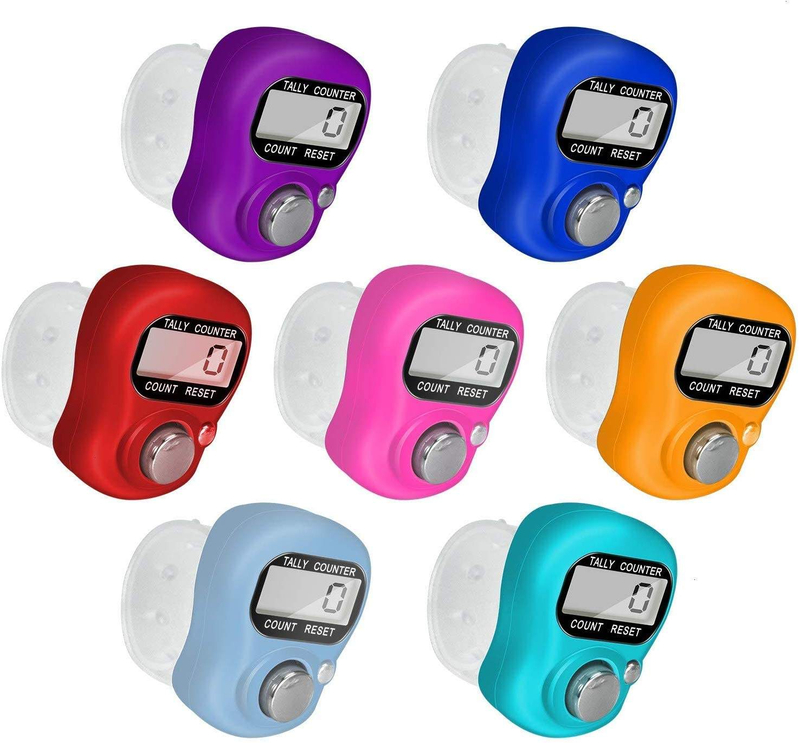
A finger counter is a small electronic tally device worn around one finger. You press its main button after each completed repetition, item, person, or event. The display then increases by one. This simple process removes the need to remember a running total.
Most models use an LCD or LED display and an adjustable plastic or silicone strap. A basic version has one large count button and one smaller reset button. Advanced models may add subtraction, a backlight, vibration, memory, multiple channels, or rechargeable power. Therefore, button behavior can differ between models.
Common control | Usual purpose | Check before starting |
Count button | Adds one to the displayed total | Confirm one press creates one count |
Reset button | Returns the display to zero | Learn whether it needs a short or long press |
Light button | Illuminates the display briefly | Use it only when visibility is poor |
Add/subtract controls | Correct or adjust the total | Test both controls before live counting |
GreatHome offers a Digital LED Finger Counter with Smart Ring Design - GreatHome covering adjustable ring designs, one-button counters, two-button versions, and rechargeable models. Some are intended for tasbih counting, while others suit sports, events, or crowd management.
Before using any electronic finger counter, inspect the display and strap. The screen should be readable, and the band should sit securely without restricting circulation. Press the count button several times, then test the reset control. This short check prevents surprises during an important counting task.
Battery-powered models may wake after the first press. Some return to sleep after inactivity while keeping the current tally. Others may clear data after battery removal. Review the supplied manual before relying on memory, vibration, or automatic screen-off functions.
Mechanical handheld clickers work differently and usually use number wheels. This guide focuses on wearable digital models, although the basic one-click, one-event rule remains the same.
Learning how to use a finger counter takes only a minute. Reliable results, however, depend on a consistent method. Use these steps before every new counting session.
1. Fit the strap comfortably. Place the counter on your index or middle finger. Adjust the band until the display stays upright. Your thumb should reach the main button without stretching.
2. Wake or power the device. Press the count button once if the screen is blank. Recharge the unit or check its battery when the display remains dark.
3. Identify every control. Find the count, reset, light, and subtract buttons. Test unfamiliar controls before recording a real total.
4. Clear the previous tally. Press or hold reset until zero appears. The required action varies, so follow your model instructions.
5. Define one count. Decide what each click represents. It might mean one prayer, stitch, lap, visitor, product, or completed repetition.
6. Click after completion. Finish the action first, then press once. This order reduces early clicks and accidental double counting.
7. Check the display periodically. Pause at planned intervals, such as every 25 or 100 items. Compare the number against batches, rows, or physical groups.
8. Record the final total. Write down the result before pressing reset. This habit matters when the device lacks permanent memory.
A typical digital finger counter does not count movement automatically. It records deliberate button presses. The broader tally counter overview explains this one-event-at-a-time principle across mechanical and electronic models.
Keep your counting hand relaxed. A tight grip can cause fatigue and unplanned clicks. If the task moves quickly, practice ten sample counts first. Listen or feel for button feedback, then confirm the display shows ten.
Never assume a smaller button is always reset. On some smart counters, it may change channels or activate lighting. When uncertain, check the product manual before holding any control.
A ring tally counter is useful whenever actions happen one at a time. It leaves most of the hand available and avoids phone notifications. The best method depends on what you are counting.
A finger counter for prayer can track dhikr, tasbih, mantra, or breathing cycles. Set a clear target before starting, such as 33, 99, or another chosen number. Press after each complete recitation. Keep the display facing inward when you want fewer visual distractions.
Knitters can use a finger counter for rows, stitches, pattern repeats, or completed pieces. Choose only one unit per session. For example, count rows on the device and track stitches through pattern markers. Record the total before removing the counter or changing projects.
Coaches and athletes can count repetitions, sets, laps, pitches, strokes, or successful drills. Press after the movement finishes, not while it is happening. For rapid circuits, assign one person to count. This protects form and keeps the record consistent.
Staff can record visitors, attendance, traffic, stock units, samples, or finished parts. Create a clear inclusion rule before counting. For entrance monitoring, decide whether staff, repeat entries, and children belong in the same total.
Use separate counters for entries and exits.
Label counters when several totals run together.
Reconcile the display against batch sheets at fixed intervals.
Photograph or write down totals before shift changes.
The device works best for individual events. It cannot identify duplicates, explain category differences, or replace a controlled inventory system. When mistakes carry financial or safety consequences, pair the counter with batch labels, written logs, or a second count.
For mixed categories, do not depend on memory between clicks. Use multiple counters or finish one category before starting another. Clear labels prevent totals from being assigned to the wrong group.
Accurate counting starts before the first click. Define the object, event, and stopping point. Then use the same thumb, button pressure, and click timing throughout the task. Switching methods halfway through creates more errors than the counter itself.
A practical counting rule is “complete, click, confirm.” Complete one unit, press once, and confirm feedback through sound, touch, or the display. During long sessions, divide work into batches. A 500-item check becomes easier when verified as five groups of 100.
Choose features according to the working environment:
Display: Large digits help in warehouses, outdoor events, and low-light rooms. A backlight improves visibility but uses more power.
Button feedback: A clear tactile response helps during fast counting. Quiet models suit prayer spaces, classrooms, libraries, and meetings.
Strap comfort: An adjustable band should remain stable without pinching. Test it during realistic hand movement.
Counting range: Five digits may suit large crowds or production totals. Smaller tasks rarely need an oversized range.
Correction tools: Add and subtract buttons help when errors are common. Simple counters reduce control mistakes.
Power and memory: Rechargeable models reduce disposable battery use. Memory matters when sessions continue after sleep or interruption.
GreatHome describes integrated research, development, production, injection molding, finishing, and printing capabilities on its Chess Timers & Competitive Equipment Manufacturer - GreatHome. Those capabilities matter to B2B buyers comparing customized housings, colors, printed marks, button layouts, and repeat production.
For team use, test samples under real conditions before ordering volume. Check strap fit across several users, screen readability, reset resistance, button life, packaging, and battery access. A counter may look suitable online yet feel awkward after hundreds of presses.
Accuracy also requires a clear handover process. The current operator should state the total aloud, show the display, and record it. The next operator should confirm the same number before continuing.
Most finger counter problems come from weak power, unclear button operation, or dirt around the controls. Start with the simplest cause. Avoid opening the housing until you have checked the manual and any warranty terms.
Problem | Likely cause | Practical fix |
Blank or dim display | Sleep mode or weak battery | Press a button, recharge, or replace the correct battery |
Count does not increase | Incomplete press or worn control | Press firmly, test slowly, then restart the device |
Counter will not reset | Wrong button or insufficient hold time | Follow the manual and hold reset until zero appears |
Count rises twice | Button bounce or repeated thumb pressure | Slow the press and release fully between clicks |
Total disappeared | Accidental reset or unsupported memory | Record checkpoints and protect the reset control |
Wipe the housing using a soft, dry cloth. Do not submerge it unless the manufacturer gives a specific water-resistance rating. Keep liquids, solvents, metal dust, and abrasive cleaners away from the display and button gaps.
Store the device where its buttons cannot remain compressed. Remove a replaceable battery before very long storage when the manual recommends it. Rechargeable models should use the specified cable and charging conditions.
If the display weakens, install the exact battery type listed for your model. Observe polarity and close the compartment securely. A generic digital finger tally counter manual also notes adjustable fit, reset operation, and basic safety considerations.
Reset behavior deserves special care. Some devices reset after one short press, while others require a long press. Smart models may save a previous session before starting again. Test this function before fieldwork, worship, teaching, or production counting.
Stop using a counter when its casing cracks, the battery leaks, or the strap cannot hold it safely. For children, follow the stated age warning and provide adult supervision. Small batteries and detachable parts can present serious hazards.
A finger counter turns repeated actions into a visible, manageable total. Fit it comfortably, test every control, reset carefully, and click only after each completed unit.
Good records and regular checkpoints make the device more reliable. GreatHome provides finger counter options for personal, professional, and customized counting needs.
A: Usually not. Most models add one only when you press the count button.
A: Press or hold reset until zero appears. Follow your model instructions.
A: Some models retain totals during sleep. Others lose data after resetting or battery removal.
A: Use it for prayers, rows, repetitions, laps, visitors, inventory, samples, or production pieces.
A: Follow the age warning. Young children need adult supervision, especially around small batteries.