Views: 0 Author: Site Editor Publish Time: 2026-05-13 Origin: Site
Time management tools govern almost every space we occupy. They dictate everything from massive industrial machinery cycles to the brief focused sprints we execute at our desks. You will find timers silently controlling circuits behind the walls, just as you find them actively pacing classrooms.
However, a significant problem exists in how we design these tools. Traditional timers favor precise electrical sequencing over human cognitive needs. Standard digital clocks and mechanical dials fail to help our brains intuitively grasp time passing. They force users into stressful mental calculations, requiring us to constantly subtract the current time from our target deadline.
Bridge this gap by looking beyond standard machine-centric hardware. Modern offices, classrooms, and neuro-inclusive environments now embrace the visual timer for better task evaluation. You will learn the core hardware types, foundational operational logic, and exactly how to evaluate these tools for highly productive spaces.
At the hardware level, the two basic types of timers are mechanical (spring-driven) and electronic/digital (quartz-regulated).
At the logic level, timer operations fundamentally divide into ON-delay (initiating an action after an interval) and OFF-delay (sustaining an action until an interval ends).
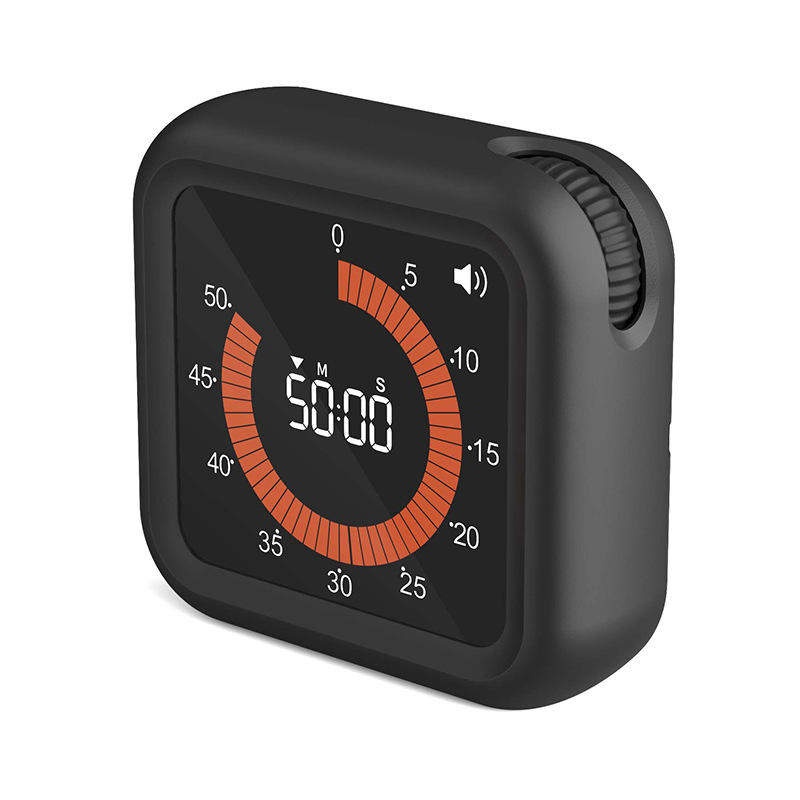
Traditional digital countdowns induce "clock-watching" fatigue; evaluating an innovative visual timer shifts the focus from calculating time to experiencing time as a tangible, diminishing mass.
Selecting the right visual timer requires assessing silent operation mechanisms, visual contrast ratios, and environmental scalability (physical vs. app-based).
Buyers must first understand underlying drive mechanisms before purchasing equipment. This knowledge allows you to evaluate lifespan, accuracy, and ongoing maintenance costs accurately. At the hardware level, devices divide into mechanical and electronic categories.
Mechanical timers trace their evolutionary roots back to historical sand hourglasses. Modern iterations rely entirely on mainsprings and complex gear trains to track time.
You operate them by physically turning a dial. This winding action stores kinetic energy inside the mainspring. As the spring slowly unwinds, it drives the internal gear train to count down the minutes. Because they rely on physical tension, these units require absolutely no electricity or batteries.
Mechanical hardware presents distinct advantages. They boast zero power dependency. You can deploy them in rugged outdoor environments, industrial kitchens, or remote job sites. They also offer a very low Total Cost of Ownership (TCO) since you never need to replace batteries or update software.
However, mechanical systems carry notable drawbacks. The gear escapement creates an inherent ticking noise. This repetitive sound often distracts individuals trying to perform deep, focused work. Furthermore, mechanical mainsprings lose physical tension unevenly. This results in lower precision over longer time intervals.
Electronic timers represent the modern standard for precision control. Rather than relying on physical gears, these devices utilize quartz crystal oscillators or software-based system clocks.
When you introduce an electrical current to a quartz crystal, it vibrates at a highly stable, precise frequency. Microchips count these vibrations to measure time down to the millisecond. This exact precision makes electronic units ideal for scientific laboratories, athletic events, and complex industrial automation.
They enable complex, multi-stage programming. You can set them to cycle through various intervals automatically throughout the day.
Despite their accuracy, electronic timers impose a high cognitive load on human users. They require you to read and process abstract numbers constantly. Additionally, they remain entirely battery or power-dependent. A sudden power loss can erase saved programming schedules entirely.
Table 1: Mechanical vs. Electronic Hardware Comparison Feature Mechanical Timers Electronic/Digital Timers Core Mechanism Mainspring and gear train Quartz oscillator or software clock Power Source Kinetic energy (manual winding) Battery or AC power Precision Level Moderate (declines over long intervals) Extremely high (millisecond accuracy) Acoustic Profile Inherent ticking noise Silent operation (audible alarms only) Ideal Environment Rugged kitchens, outdoor areas, workshops Laboratories, automated factories, standard offices
Hardware mechanisms explain how a device keeps time. Control logic explains how a device executes commands. Borrowing principles from industrial automation and Programmable Logic Controller (PLC) systems, all timers rely on two foundational operational behaviors.
Whether you are controlling a massive factory motor or managing a brief team meeting, the system utilizes either ON-delay or OFF-delay logic.
In an ON-delay operation, time elapses before an action triggers. The device receives a start signal, counts down the designated interval, and then executes the final command.
Engineers use this logic heavily in industrial automation. Imagine starting a factory conveyor belt. If all heavy motors start simultaneously, the massive power draw overloads the electrical grid. Engineers stagger the motor startups using ON-delay logic to prevent system failures.
In human terms, the classic alarm clock represents an ON-delay system. You set the device, wait 25 minutes, and then the alarm sounds to signal a break.
The ON-delay Operational Sequence:
The user or system applies a trigger signal (e.g., pressing start).
The internal clock begins accumulating time.
The system reaches the preset interval value.
The output activates (e.g., an alarm rings or a motor starts).
OFF-delay logic functions as the exact opposite. The action occurs immediately upon triggering. The system then sustains that action and only powers down after the time elapses.
Industrial applications frequently use OFF-delay systems for cooling procedures. When a machine operator shuts down a massive engine, the cooling fan must continue running to dissipate residual heat. The OFF-delay system allows the exhaust fan to run for exactly 10 minutes post-use before automatically turning off.
For human productivity, this translates to granting a focused interval of work before a hard stop. You allocate 30 minutes for a brainstorming session. Work begins immediately, and the session formally concludes when the interval expires.
The OFF-delay Operational Sequence:
The user or system applies a trigger signal.
The output activates immediately (e.g., a fan turns on or a meeting begins).
The trigger signal is removed, prompting the clock to begin timing.
The system reaches the preset interval value, and the output deactivates.
Traditional hardware and control logic work perfectly for machines. Circuits do not experience fatigue or anxiety. Humans, however, process time very differently. This creates a severe cognitive gap between standard equipment and human psychological needs.
Digital numbers and ticking mechanical hands require left-brain processing. Time remains an abstract, invisible concept. When you look at a digital clock reading "14:32" and know a meeting ends at "15:00", you must perform mental arithmetic.
Users must calculate the difference between the current time and the target time continually. This constant background calculation causes cognitive friction. It drains mental energy you should apply to the actual task at hand.
Standard numerical countdowns frequently trigger anxiety. They encourage "clock-watching" behavior. Employees or students stare at descending numbers rather than focusing on their work. In high-stakes environments like testing centers or executive boardrooms, this anxiety compounds rapidly.
This risk increases significantly for neurodivergent individuals. People managing Attention Deficit Hyperactivity Disorder (ADHD) or autism often experience "time blindness." Abstract numbers fail to communicate the urgency or mass of passing time effectively. Standard tools actively hinder their workflow rather than supporting it.
Modern productivity experts address this gap by shifting entirely to visual representation. They introduce tools that translate abstract numerical countdowns into a disappearing block of high-contrast color.
This approach aligns with spatial awareness rather than mathematical calculation. You no longer read time; you see time. As the color disc shrinks, the brain intuitively understands exactly how much time remains without processing any numbers. It transforms time into a tangible, diminishing mass. This simple shift drastically reduces anxiety and restores executive function.
Organizations and individuals ready to upgrade their productivity tools face a crowded market. Buyers must choose carefully between physical analog-style units, digital-visual hybrids, and software-based applications.
Physical Analog-Style: Traditional desk units featuring a physical colored disc. They offer immediate tactile engagement and require zero screen time.
Digital-Visual Hybrids: LCD screens displaying a visual color block alongside optional numerical data. They bridge the gap between abstract accuracy and intuitive visualization.
App-Based Software: Programs installed on tablets or enterprise computers. They allow seamless integration into digital workflows but introduce potential screen distractions.
You must evaluate potential purchases across four critical dimensions to ensure successful adoption in your environment.
Acoustic Profile
Does the unit feature a truly silent quartz sweep mechanism? Many cheap physical units use ticking gear mechanisms. You must prioritize absolute silence for open-plan corporate offices, special education classrooms, and standardized testing centers. Ticking destroys deep focus.
Visual Clarity and Contrast
Evaluate the display quality. Is the disappearing disc highly visible from across a large conference room? Check the color contrast ratios. The best manufacturers design their color blocks to accommodate colorblind users, ensuring universal accessibility across diverse teams.
Alarm Customization
Can you adjust the completion signal? Environments differ drastically in their sensory requirements. A library needs a silent visual flash or a gentle vibration. A bustling kitchen requires a loud, persistent beep. Look for units offering complete volume control and multiple alert modes to suit different sensory thresholds.
Durability vs. Portability
Assess the physical construction based on your daily usage. Classroom environments require impact-resistant casings and shatterproof lenses. Conversely, corporate desk environments favor sleek form factors, premium materials, and compact portability for slipping into laptop bags.
True market leaders offer more than just a red disc. When evaluating an Innovative visual timer, look for hybrid functionalities. The best models combine the intuitive color-disc visualization of mechanical units with the precise programming capabilities of digital units.
Seek out models featuring Pomodoro interval presets. These allow users to trigger 25-minute focus blocks instantly without manual dial adjustments. Additionally, prioritize units utilizing USB-C rechargeable batteries over disposable ones to reduce long-term electronic waste.
Table 2: Buyer's Evaluation Checklist Feature Category Standard Model Example Innovative Visual Timer Standard Acoustic Mechanism Audible mechanical ticking 100% silent quartz or solid-state operation Alarm Options Fixed volume beep Adjustable volume, silent flash, and vibration Power Source Disposable AA batteries USB-C rechargeable lithium-ion battery Programming Manual dial setting only Quick-access interval presets (e.g., Pomodoro)
Purchasing time management tools for an entire organization requires a thorough analysis of return on investment (ROI) and scalability. A tool only provides value if users actually adopt it and if it reduces operational friction.
Physical units typically feature a low upfront cost. However, buyers must factor in the cost of ongoing battery replacement. Opting for USB-C rechargeable models significantly lowers the Total Cost of Ownership over a five-year lifespan.
Software-based applications present a different financial model. You must evaluate ongoing monthly subscription costs per user. Furthermore, enterprise IT departments must audit these applications for data privacy compliance, especially in strict educational or corporate settings.
Implementing intuitive time tools yields measurable business outcomes. Teams experience distinct benefits when they stop fighting abstract numerical clocks.
Reduced Meeting Overruns: Placing a large, silent visual tool in a conference room creates a shared understanding of time. Speakers naturally pace their presentations as the color block shrinks, drastically reducing expensive meeting overruns.
Minimized Context-Switching: Dedicated physical tools prevent employees from using their smartphones to check the time. This eliminates the risk of getting distracted by push notifications, saving hours of wasted context-switching time weekly.
Faster Task Initiation: Turning a dial to visualize 15 minutes lowers the psychological barrier to starting difficult tasks. Teams overcome procrastination faster when time feels contained and manageable.
Beyond raw productivity, these tools fulfill critical accessibility standards. Providing visual time-management devices qualifies as a reasonable accommodation for neurodivergent employees or students. It creates a genuinely inclusive environment that supports diverse cognitive processing styles without singling anyone out.
You must acknowledge implementation realities. A timer is a tool, not a standalone magical cure for procrastination or poor management. Rollout success depends entirely on team or classroom agreement.
Leaders must establish clear boundaries. If a manager sets a 30-minute visual block for deep work but continues to interrupt employees with trivial questions, the tool loses all authority. You must foster a culture that respects the visual boundaries set by the device.
Selecting the right time management tool depends entirely on your target environment. If your goal involves precise industrial automation or complex circuit control, electronic ON/OFF delay timers remain the undisputed standard. They handle electrical loads and complex sequencing flawlessly.
However, for human productivity, behavior management, and focused executive execution, traditional abstract timers are functionally obsolete. They cause cognitive friction and unnecessary anxiety.
Buyers should immediately audit their specific environment—whether it is a bustling elementary classroom, a personal corporate desk, or an executive meeting room. Determine your necessary acoustic requirements, size constraints, and desired feature sets. Use this framework to confidently shortlist a physical or digital visual tool that actually supports human cognitive processing.
A: The difference lies in the trigger logic. An ON-delay timer waits for a set time interval to elapse before it initiates an action (like waiting 5 minutes to start a motor). An OFF-delay timer initiates the action immediately upon triggering, sustains it, and then powers down after the time interval ends (like running a cooling fan for 10 minutes after shutdown).
A: Smartphones inherently introduce notification distractions. To check the time, you must unlock a screen, exposing yourself to emails and social media alerts. A visual timer serves as a dedicated, ambient tool. It allows you to check remaining time at a glance without ever breaking your focus or engaging with a digital interface.
A: Yes. Innovative models perfectly map to the interval-on-operate logic required for the Pomodoro Technique. You easily set the visual color block for a 25-minute focus session. Once the color disappears, you take a 5-minute break. The visual shrinking mass keeps you focused without checking the clock.
A: No. This is a common myth. While they are incredibly effective for children and ADHD management, they are premier executive-level productivity tools. Top-tier professionals, project managers, and corporate teams use them to prevent meeting overruns, structure brainstorming sessions, and execute deep work efficiently.


